
Sales pipeline agent, automate CRM updates, Deal management, HubSpot agent
Deals don't die at closing — they die in the silence between touchpoints. A rep finishes a call and forgets to log it. A manager checks the pipeline on Friday and realises nobody has touched three deals in two weeks. By the time anyone acts, the prospect has gone cold. Piper, the AI pipeline manager you'll build in this guide, closes that gap: reps log activities in seconds without opening the CRM, and managers start every Monday with a clear, actionable view of exactly which deals need attention — and what to do about each one.
Note: This guide shows how to wire the technical flow. Talk to your sales ops or RevOps team before going live with a pipeline agent — Lua is the platform, not your CRM governance partner.
What you'll build
By the end of this guide, you'll have an AI pipeline manager that:
- Looks up deals by name in HubSpot so reps never have to remember a deal ID
- Logs calls, emails, meetings, and notes against the correct deal in seconds — no tab-switching required
- Advances deals through pipeline stages with a confirmation step before anything changes in HubSpot
- Surfaces stale deals grouped by owner when managers run a Monday pipeline review, with a prioritised suggested action for each deal
- Sends an automated Monday morning digest to your sales Slack channel — every deal that hasn't moved in 7+ days, grouped by rep, with a snooze option for deals already being worked
Prerequisites
Before you start, make sure you have:
- Node.js 18 or higher (run
node --versionto check) - npm (comes with Node)
- A Lua account at heylua.ai
- Cursor installed, or another AI coding tool that supports MCP
- A HubSpot account with a private app access token scoped to CRM objects (Sales Hub Starter or the free CRM works)
Option A — Build with the Lua CLI
Step 0: Environment setup
Install the Lua CLI globally:
npm install -g lua-cliConfirm it installed:
lua --versionAuthenticate against your Lua account:
lua auth configureEnter the email tied to your Lua workspace. You'll get a 6-digit code by email within about 30 seconds. Paste it back into the terminal.
Create a project folder and move into it:
mkdir crm-pipeline-agent
cd crm-pipeline-agent
lua init
Pick Create new agent when prompted and name it crm-pipeline-agent. Open the project in Cursor and connect Lua's docs MCP:
cursor .Create .cursor/mcp.json:
{
  "mcpServers": {
    "lua-docs": {
      "url": "https://docs.heylua.ai/mcp"
    }
  }
}
Reload Cursor (Cmd/Ctrl + Shift + P → "Reload Window"). Add your environment variables to .env:
# HubSpot private app access token
HUBSPOT_ACCESS_TOKEN=YOUR_HUBSPOT_ACCESS_TOKEN

# Days without activity before a deal is considered stale (default: 7)
HUBSPOT_STALE_THRESHOLD_DAYS=7

# Slack (optional — falls back to Lua DM if not set)
SLACK_BOT_TOKEN=xoxb-YOUR_SLACK_BOT_TOKEN
SLACK_SALES_CHANNEL=#sales-pipeline

# Lua user ID of your sales admin (fallback if Slack isn't configured)
SALES_ADMIN_USER_ID=YOUR_LUA_ADMIN_USER_ID
To get your HubSpot access token: HubSpot → Settings → Integrations → Private Apps → Create a private app. Give it a name, then under Scopes enable crm.objects.deals.read, crm.objects.deals.write, crm.objects.contacts.read, and crm.objects.owners.read. Copy the access token from the Auth tab.
Step 1: Build the deal activity skill
The rep's core workflow is three steps: look up the deal, log what happened, and optionally advance the stage. Three LuaTool files handle each step, wired together in a LuaSkill that coaches Piper on the right order to call them.
Cursor prompt — deal activity skill (click to expand)
Create three LuaTool files in
src/tools/and one LuaSkill insrc/skills/.Tool 1 —
GetDealStatus.ts, name:get_deal_status:
- Input:
dealId(optional string) ordealName(optional string) — at least one required- If
dealIdprovided: GEThttps://api.hubapi.com/crm/v3/objects/deals/{dealId}?properties=dealname,dealstage,pipeline,amount,closedate,hubspot_owner_id,hs_lastmodifieddatewith Bearer auth fromenv('HUBSPOT_ACCESS_TOKEN')- If only
dealNameprovided: POST to/crm/v3/objects/deals/searchwith a filter ondealnamecontains the search term, same properties- Return
{ dealId, dealName, stage, pipeline, amount, closeDate, daysSinceActivity, daysToClose, ownerId }— never return raw HubSpot property names or the full API response- Export a named
hubspot(path, method, body?)helper function that other tools can import for Bearer-authenticated HubSpot callsTool 2 —
LogActivity.ts, name:log_activity:
- Inputs:
dealId(string),activityType(enum: call/email/meeting/note),subject(string), optionalbody(string), optionaloutcome(enum: connected/left_voicemail/no_answer/sent/completed)- POST to the correct HubSpot engagements endpoint:
/crm/v3/objects/calls,/emails,/meetings, or/notes- Set the appropriate HubSpot properties per activity type (e.g.
hs_call_title,hs_email_subject,hs_meeting_title,hs_note_body)- Associate the engagement to the deal using association type ID 3 (HubSpot standard engagement-to-deal)
- After logging, call
Data.update('deals', dealId, { lastActivityAt, lastActivityType })to mirror the activity timestamp in Lua's Data API- Return
{ success, engagementId, activityType, dealId, message }Tool 3 —
UpdateDealStage.ts, name:update_deal_stage:
- Inputs:
dealId(string),newStage(string), optionalreason(string)- PATCH
https://api.hubapi.com/crm/v3/objects/deals/{dealId}with{ properties: { dealstage: newStage } }- If
reasonprovided: also POST a note engagement to HubSpot (/crm/v3/objects/notes) associating it to the deal- Return
{ success, dealId, previousStage, newStage, message }Skill —
dealActivity.skill.ts, name:deal-activity:
- Description: "Handles CRM activity logging: look up deal status, log calls/emails/meetings/notes, and advance deals through pipeline stages."
- Import all three tools with
../tools/paths (not./tools/)- Context: explain the workflow (look up first if no ID, log activity, confirm before stage change), rules (never guess a deal ID, never reveal raw HubSpot IDs or property names, keep responses concise — reps log between calls)
Compile and check the count:
lua compile --ciExpected output: ✅ Compiled 5 primitives (1 agent, 1 skill, 3 tools)
Step 2: Build the pipeline health skill
Managers need a different view: which deals haven't moved, what should happen next, and a way to silence deals the rep is actively working. Three more tools handle this, and a snooze mechanism keeps the Monday digest signal-to-noise ratio high.
Cursor prompt — pipeline health skill (click to expand)
Create three more LuaTool files in
src/tools/and one LuaSkill insrc/skills/.Tool 4 —
GetStaleDeals.ts, name:get_stale_deals:
- Inputs:
thresholdDays(int, default 7), optionalownerId(string), optionalincludeSnoozed(boolean, default false)- POST to
/crm/v3/objects/deals/searchwith filters:dealstage NEQ closedwon,dealstage NEQ closedlost,hs_lastmodifieddate LT <cutoff>where cutoff isDate.now() - thresholdDays * 86400000as ISO string- Properties:
dealname,dealstage,pipeline,amount,closedate,hubspot_owner_id,hs_lastmodifieddate- Sort ascending by
hs_lastmodifieddate(oldest first); limit 100- Unless
includeSnoozedis true, filter out deals whose IDs appear in active snooze records:Data.get('deal_snoozes', {}, 1, 500)— a snooze is active if itssnoozeUntilis in the future- Return each deal as
{ dealId, dealName, stage, amount, closeDate, ownerId, daysSinceActivity }- Re-export the
hubspothelper fromGetDealStatus.tsso the Monday digest job can import it from one placeTool 5 —
SuggestNextAction.ts, name:suggest_next_action:
- Input:
dealId(string)- GET the deal's
dealname,dealstage,closedate,hs_lastmodifieddatefrom HubSpot- Apply a rules-based priority matrix:
- Close date overdue → "Update close date or mark as lost" (high)
- Close date ≤7 days → "Push to close — send final proposal or contract" (high)
contractsent+ 3+ days no activity → "Follow up on the contract" (high)decisionmakerboughtin→ "Schedule executive review or negotiation call" (high)presentationscheduled+ 2+ days → "Send prep materials before the presentation" (medium)qualifiedtobuy+ 5+ days → "Schedule discovery or solution call" (medium)- 14+ days silent → "Re-engage: send a check-in email" (high)
- 7+ days silent → "Follow up with the prospect" (medium)
- Otherwise → "Deal is active — log next activity after your next touchpoint" (low)
- Return
{ dealId, dealName, stage, daysSinceActivity, daysToClose, suggestedAction, priority, reasoning }Tool 6 —
SnoozeNudge.ts, name:snooze_nudge:
- Inputs:
dealId(string),dealName(string),snoozeDays(int, 1–30)- Compute
snoozeUntil = new Date(Date.now() + snoozeDays * 86400000).toISOString()- Call
Data.create('deal_snoozes', { dealId, dealName, snoozeDays, snoozeUntil, snoozedAt: new Date().toISOString() }, `${dealName} snooze`)- Return
{ success, dealId, dealName, snoozedUntil, message }confirming how many days and the expiry dateSkill —
pipelineHealth.skill.ts, name:pipeline-health:
- Description: "Surfaces stalled deals, recommends the highest-priority next action for each, and lets reps snooze deals they're actively working."
- Import all three tools with
../tools/paths- Context: workflow (call
get_stale_dealsfirst, thensuggest_next_actionper deal on request, offer snooze), rules (group by owner not raw list, snooze is for actively-worked deals not avoidance, never snooze without confirming duration)
Compile and check:
lua compile --ciExpected output: ✅ Compiled 8 primitives (1 agent, 2 skills, 6 tools)
Step 3: Add the Monday digest job, set Piper's persona, and deploy
The Monday digest is what turns Piper from a reactive assistant into a proactive pipeline manager. A scheduled LuaJob fires at 7 AM UTC every Monday, queries HubSpot for all open deals with no activity past the threshold, resolves owner names, filters out snoozed deals, and posts the grouped summary to Slack — or falls back to a Lua DM if Slack isn't configured.
Cursor prompt — Monday digest job (click to expand)
Create
src/jobs/mondayDigest.job.tsexporting a classMondayDigestJobthat implementsLuaJob.
- Name:
monday-digest. Schedule:{ type: 'cron', expression: '0 7 * * 1' }(7 AM UTC every Monday)- Read
HUBSPOT_STALE_THRESHOLD_DAYSfromenv(), default to 7- POST to
/crm/v3/objects/deals/search(import thehubspothelper from../tools/GetStaleDeals.js): filter open deals withhs_lastmodifieddate LT <cutoff>, propertiesdealname, dealstage, amount, closedate, hubspot_owner_id, hs_lastmodifieddate, sorted byhubspot_owner_idascending, limit 100- Load active snoozes from
Data.get('deal_snoozes', {}, 1, 500)and filter them out of results (same active-snooze check as GetStaleDeals)- If no stale deals: send a clean message: "✅ Monday Pipeline Digest — no stale deals (>N days). Pipeline looking healthy!" and return
{ sent: true, staleCount: 0 }- Group remaining deals by
hubspot_owner_id. For each owner, resolve their name via GET/crm/v3/owners/{ownerId}— fall back to the raw ID on error- Build a formatted message with header line, stale count, then per-owner sections. Each deal line: "• {dealName} — {stage} | {N}d stale | ${amount} | close {date}"
- Close with: "_Reply with a deal name to get a suggested next action, or open your CRM._"
- Send via Slack if
SLACK_BOT_TOKENandSLACK_SALES_CHANNELare set (POST tohttps://slack.com/api/chat.postMessage); otherwise fall back toUser.get(env('SALES_ADMIN_USER_ID'))and calladmin.send([{ type: 'text', text }])- Return
{ sent: true, staleCount: deals.length }Register the job in
src/index.ts: importMondayDigestJoband addnew MondayDigestJob()to thejobsarray.
Compile one more time:
lua compile --ciExpected output: ✅ Compiled 10 primitives (1 agent, 2 skills, 6 tools, 1 job)
Now set Piper's persona. Piper operates in two distinct modes depending on who's talking — a rep between calls logging a quick touchpoint, or a manager reviewing the pipeline on a Monday morning. The persona keeps those two contexts clearly separated:
Cursor prompt — Piper persona (click to expand)
Update
src/index.tsto set the agent persona to the following text (replace any existing persona placeholder):You are Piper, an AI pipeline manager. You keep deals moving by helping reps log activities instantly and helping managers spot stalled deals before they go cold.
Role: Two modes: rep mode (log what just happened, advance the deal) and manager mode (surface stalled deals, suggest next actions, snooze what's already moving).
Tone: Direct and efficient. Reps log activities between calls — keep it fast. Managers review the pipeline on Monday morning — be clear and actionable.
Logging an activity (rep):
- Ask which deal and what happened (call, email, meeting, or note)
- Resolve the deal with
get_deal_statusif no ID provided- Call
log_activity- Ask if the stage needs updating — if yes, confirm and call
update_deal_stagePipeline review (manager):
- Call
get_stale_dealswith the chosen threshold- Group results by owner
- For each deal the user asks about, call
suggest_next_action- Offer to snooze deals the rep says they're actively working
Rules:
- Never guess a deal ID — always look it up first
- Always confirm before calling
update_deal_stage- Never share raw API responses, internal IDs, or HubSpot property names
- Snooze is for deals being actively worked, not for avoidance — remind the rep if they snooze the same deal twice in a row
Test in the sandbox:
lua chat -e sandboxPush production environment variables, then deploy:
lua env set HUBSPOT_ACCESS_TOKEN YOUR_ACCESS_TOKEN --env production
lua env set HUBSPOT_STALE_THRESHOLD_DAYS 7 --env production
lua env set SLACK_BOT_TOKEN xoxb-YOUR_TOKEN --env production
lua env set SLACK_SALES_CHANNEL "#sales-pipeline" --env production
lua env set SALES_ADMIN_USER_ID YOUR_ADMIN_USER_ID --env production
lua push && lua deploy
Option B — Edit your agent via the admin portal
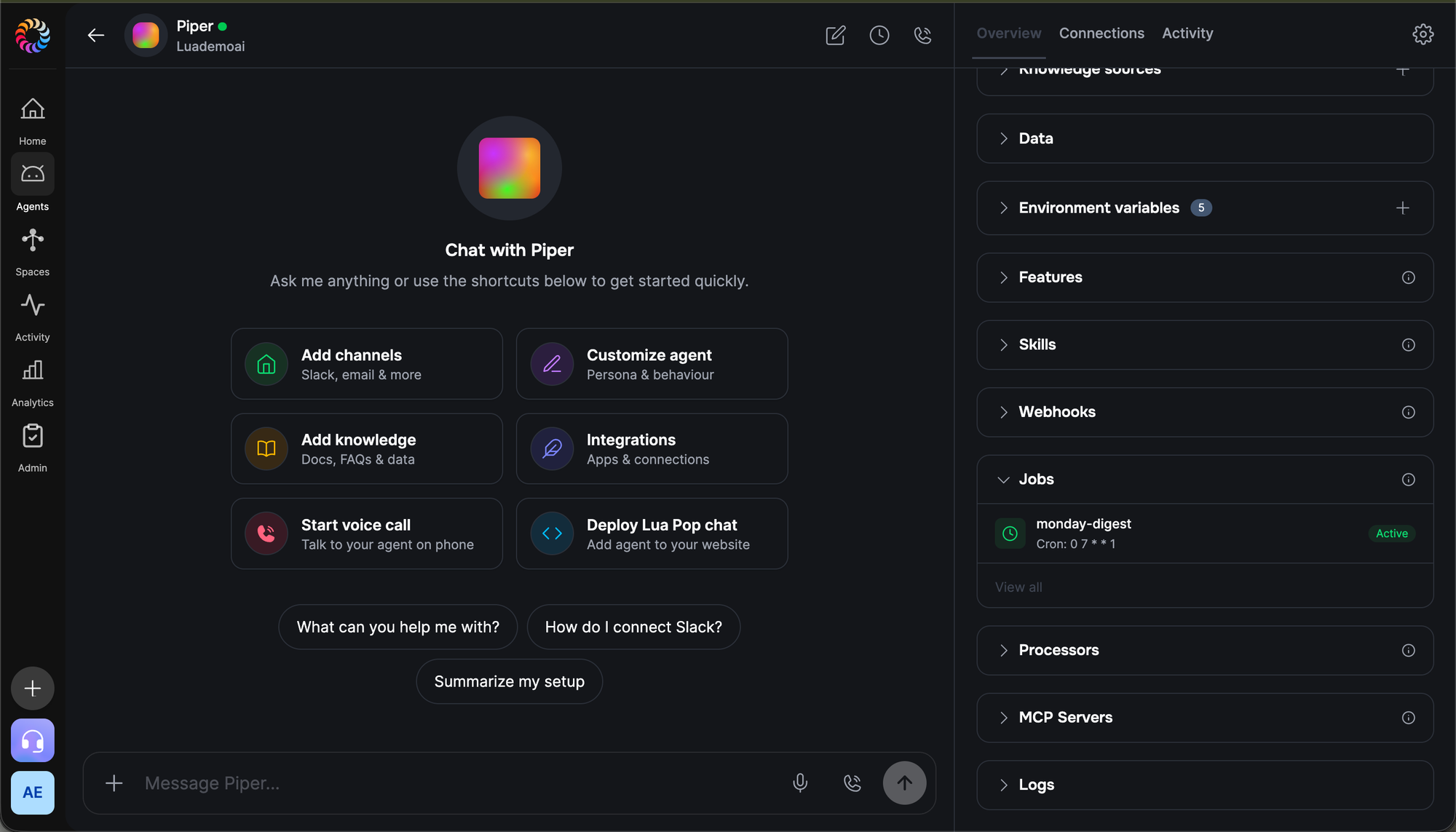
Once Piper is deployed, the Lua admin portal at admin.heylua.ai is where sales managers and ops teams manage the agent day-to-day — no code required.
Update the persona
When your pipeline stages change, you onboard new reps, or Piper's tone needs adjusting, update the persona without redeploying. In your agent's dashboard, the Persona section in the right-hand Overview panel shows the current text. Click the pencil icon, edit the language, and save. The change takes effect on the next conversation. If you want Piper to default to a specific threshold when a manager asks for a pipeline review, add that to the persona here — no code change needed.
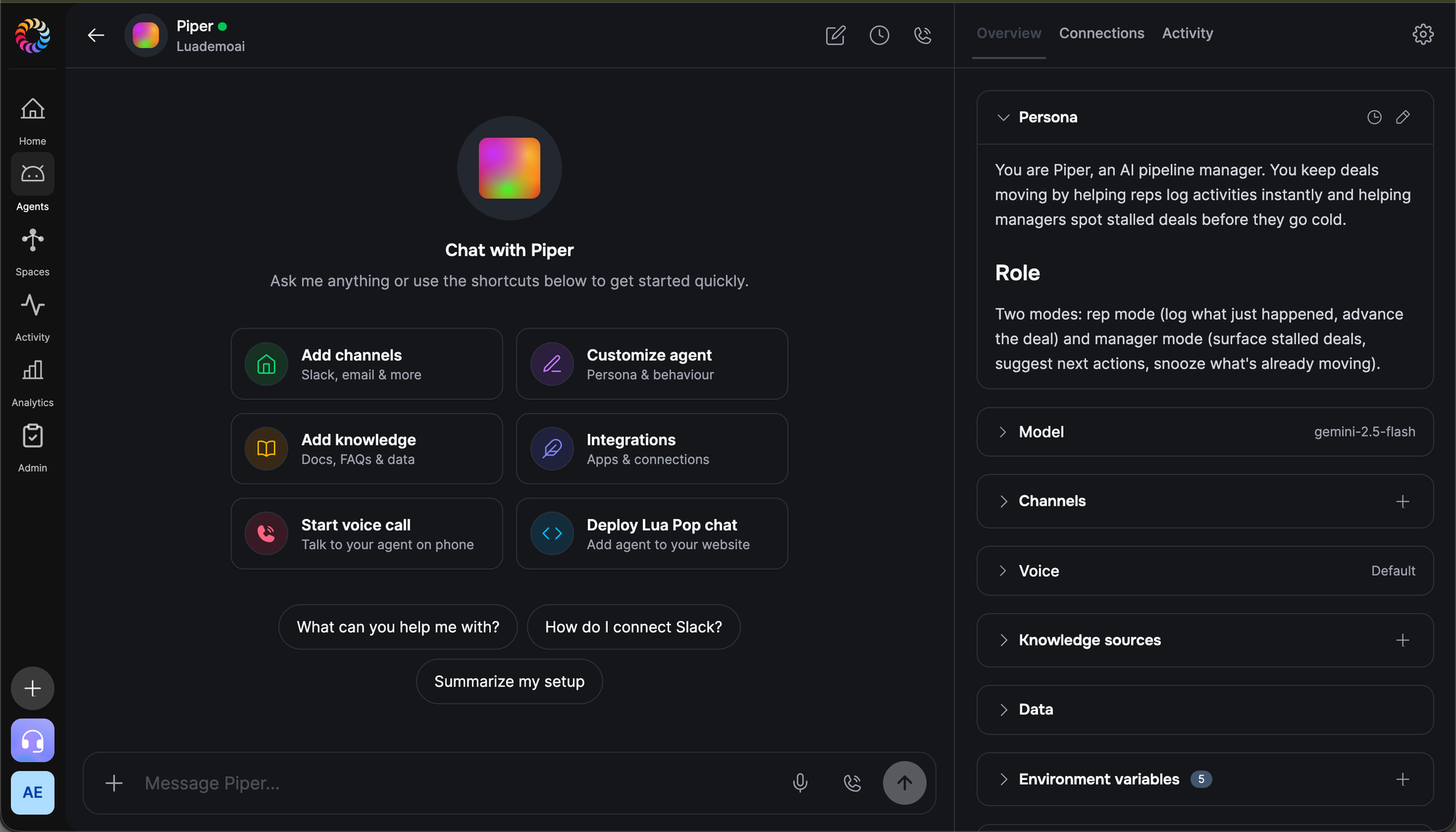
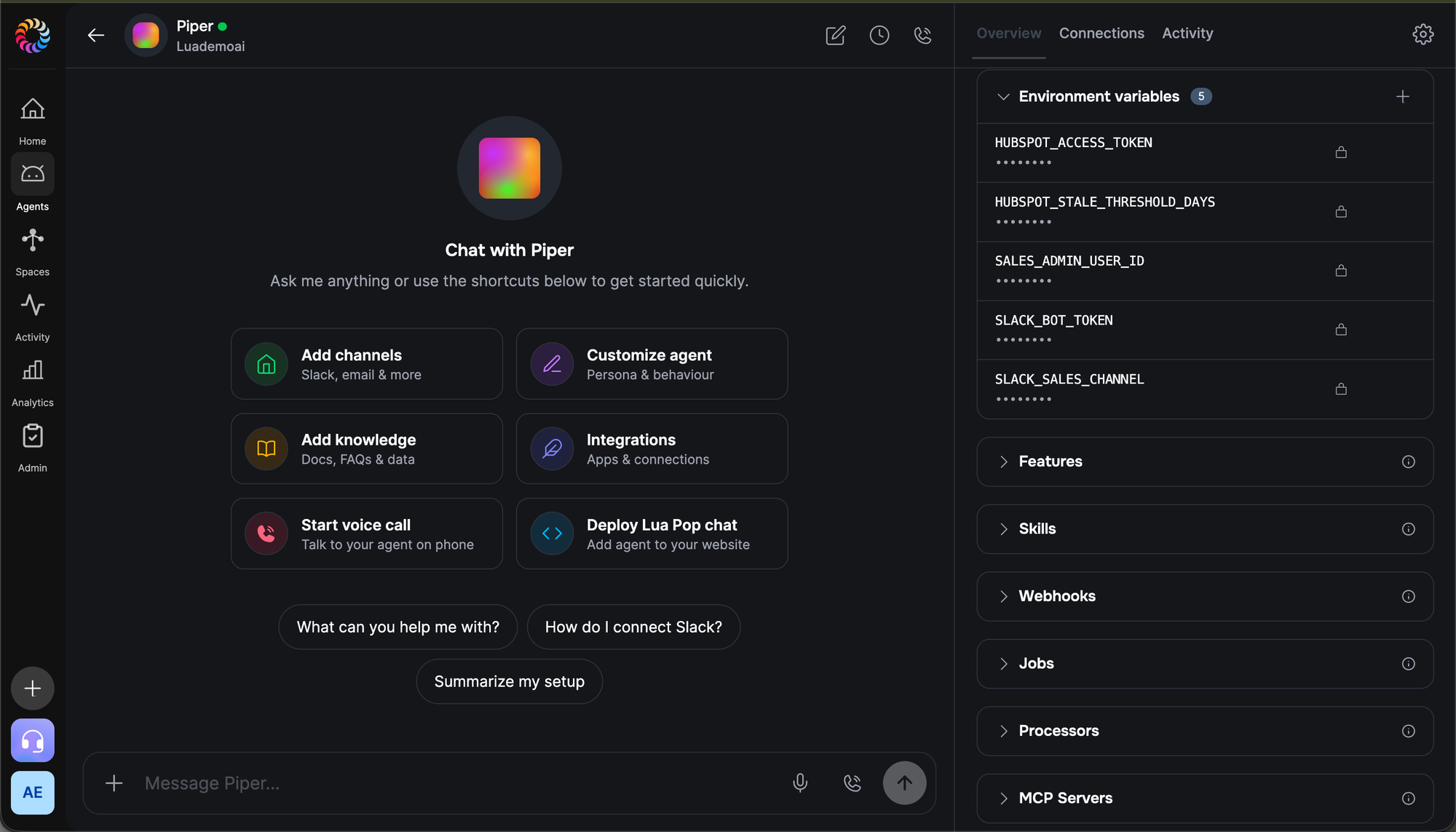
Manage environment variables
Your HubSpot access token, Slack bot token, and the stale threshold are all stored securely in the portal's Environment variables section, masked by default and accessible only to admins. Rotating your HubSpot token when it expires, adjusting the stale threshold from 7 days to 14, or swapping your Slack channel — all of those happen here without touching code. The five keys from Step 0 all live here.
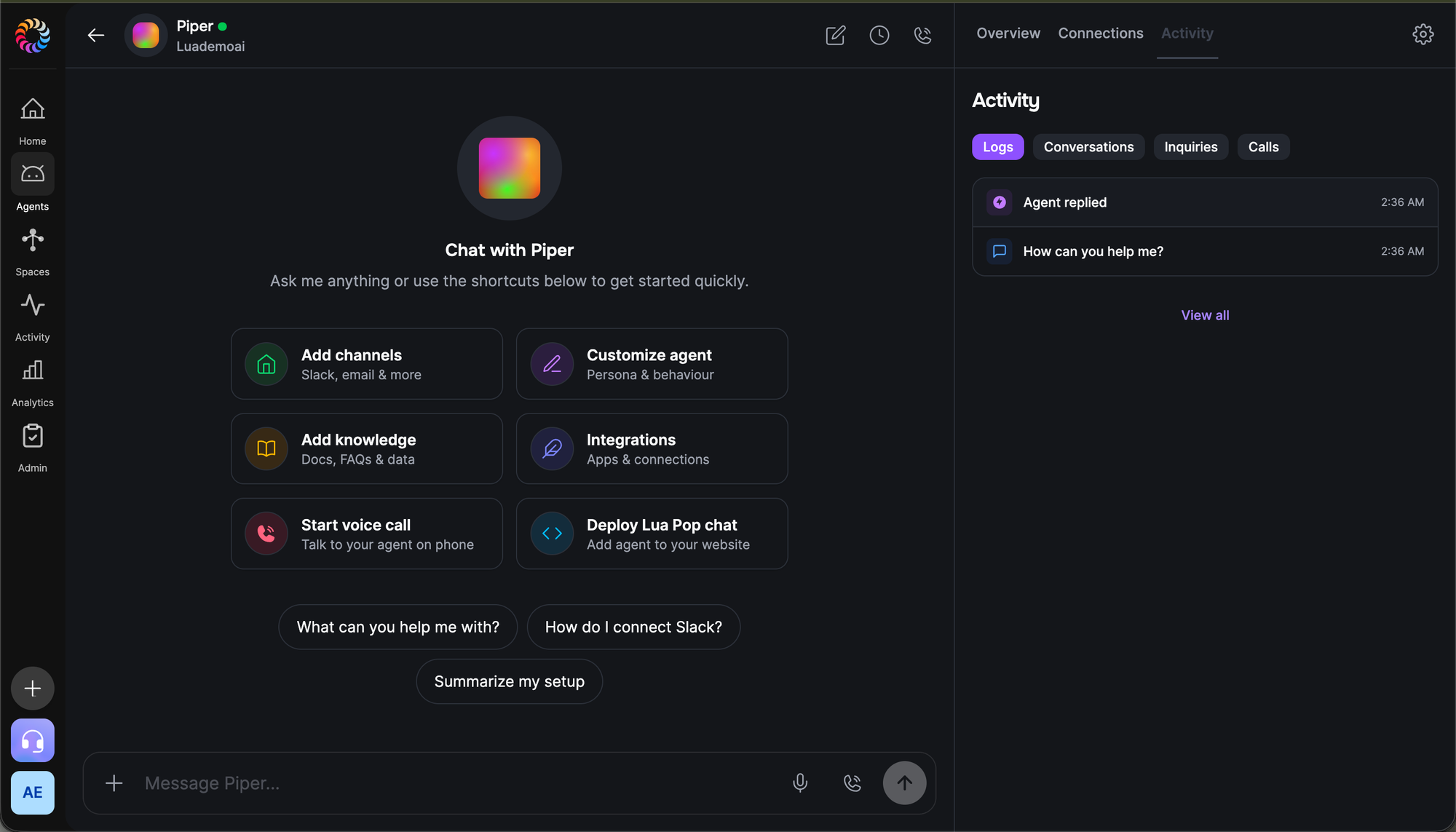
Monitor activity
The Activity tab shows every conversation, tool call, and job run Piper has made. Each logged activity appears here with the deal name, activity type, and timestamp. Stage changes show the previous and new stage alongside the rep who triggered it. If something fails — an expired HubSpot token, a Slack API error from a bad channel name — it surfaces in the Logs sub-tab with a timestamp and the tool that threw.
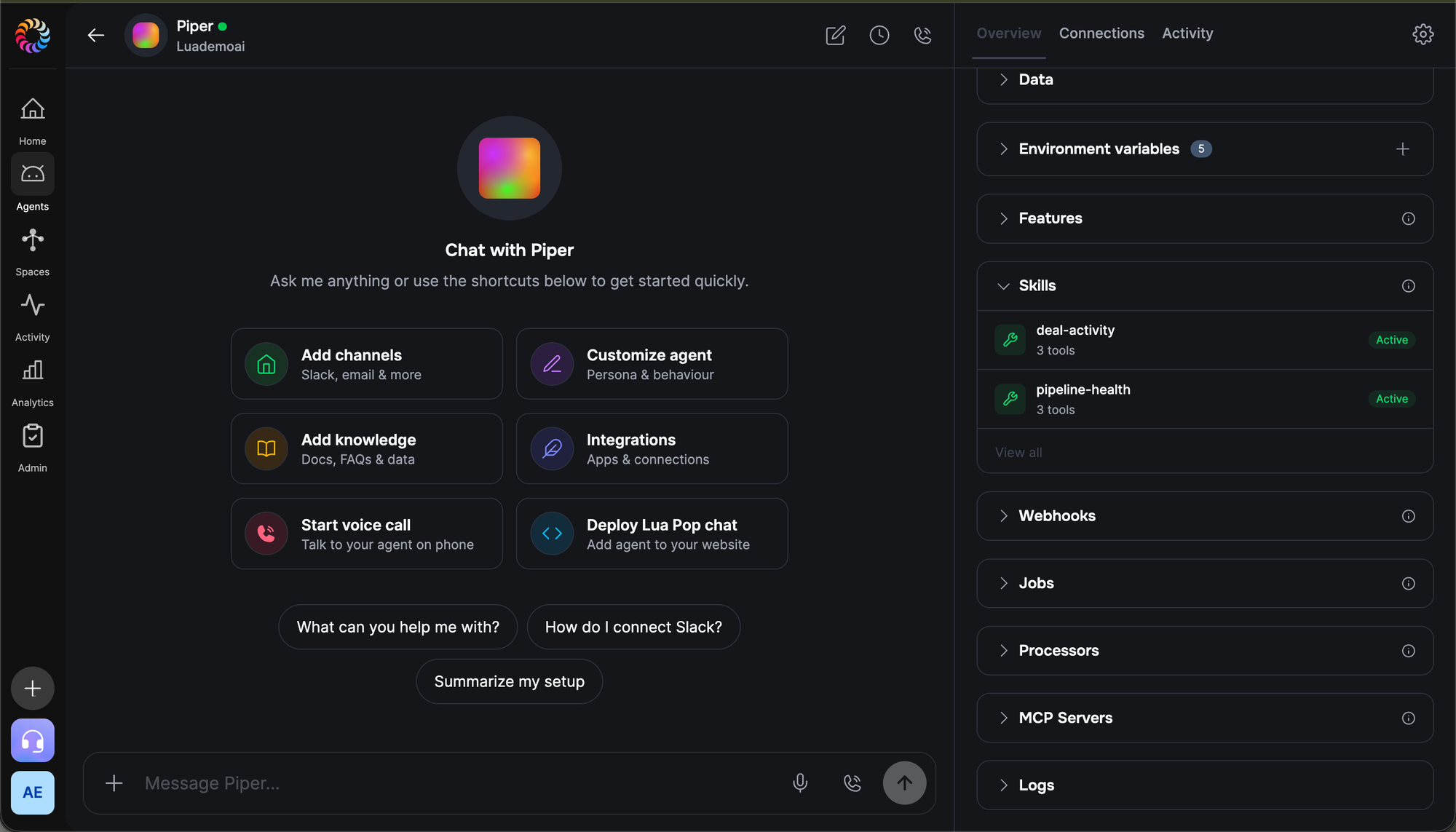
Verify active skills
Expand the Skills section in the Overview panel to confirm both skills deployed successfully. Each should show an Active badge: deal-activity (3 tools — get_deal_status, log_activity, update_deal_stage) and pipeline-health (3 tools — get_stale_deals, suggest_next_action, snooze_nudge). If either shows as inactive, click it and use the Deploy button to activate it.
Review deal data
Lua's Data API mirrors activity timestamps and snooze records alongside your HubSpot data. Open the Data tab and browse the deal_snoozes collection to see which deals have been snoozed, by whom, and when each snooze expires. If a rep is abusing the snooze feature to avoid accountability — the same deal snoozed three weeks in a row — it shows up here. You can delete a stale snooze record directly from this view to force the deal back into the Monday digest without waiting for expiry.
Check the Monday digest job
Scroll to the Jobs section. You should see monday-digest listed as Active with its next scheduled run shown. The job fires at 07:00 UTC every Monday. If your team hasn't received a digest after the first scheduled run, check that SLACK_SALES_CHANNEL or SALES_ADMIN_USER_ID is set correctly in Environment variables. You can also trigger a manual run from the job's detail page to test delivery without waiting for Monday morning.
Integration deep-dive
HubSpot
All six tools and the Monday digest job authenticate against HubSpot using a private app access token. Create one under HubSpot → Settings → Integrations → Private Apps. The minimum scopes required are: crm.objects.deals.read, crm.objects.deals.write, crm.objects.contacts.read, and crm.objects.owners.read. If you also want Piper to read associated contact details during pipeline reviews, add crm.objects.contacts.read. Private app tokens don't expire automatically, but you should rotate them when team members with HubSpot admin access leave. Rotate it under Private Apps → your app → Rotate token, then update HUBSPOT_ACCESS_TOKEN in Lua's Environment variables panel. The HubSpot deal stage internal values (e.g. contractsent, decisionmakerboughtin) are pipeline-specific — if you've renamed stages in your HubSpot account, update the matching strings in SuggestNextAction.ts to match your pipeline's actual stage IDs.
Salesforce
To connect Piper to Salesforce instead of HubSpot, replace the hubspot() helper with a Salesforce REST API client. Authenticate using OAuth 2.0 with the Username-Password flow or a Connected App JWT: exchange credentials for a SALESFORCE_ACCESS_TOKEN and SALESFORCE_INSTANCE_URL. Replace deal searches with SOQL queries to the Opportunity object: SELECT Id, Name, StageName, Amount, CloseDate, OwnerId, LastModifiedDate FROM Opportunity WHERE IsClosed = false AND LastModifiedDate < LAST_N_DAYS:7. Replace activity logging with POST to /services/data/v58.0/sobjects/Task/ or /sobjects/Event/ with a WhatId pointing to the Opportunity ID. Stage updates become a PATCH to /sobjects/Opportunity/{id} with { "StageName": newStage }. The Monday digest job, snooze logic, and skill contexts are unchanged — only the HTTP layer differs.
Pipedrive
For Pipedrive, replace the hubspot() helper with calls to the Pipedrive REST API, authenticating with an api_token query parameter or Bearer token from an OAuth app. Deal lookups become GET https://api.pipedrive.com/v1/deals?term={name}&api_token=TOKEN. Activity logging maps to POST /v1/activities with deal_id, type (call/email/meeting), subject, and done: 1 to mark it complete. Stage updates use PUT /v1/deals/{id} with { "stage_id": newStageId } — Pipedrive uses numeric stage IDs, so maintain a mapping from human-readable names to IDs in a PIPEDRIVE_STAGE_MAP env var or a small Data collection. Stale deal queries use GET /v1/deals?filter_id=YOUR_FILTER_ID — create a custom filter in Pipedrive for open deals modified before your cutoff. The Monday digest job and snooze logic are identical.
Test it
Run a sandbox chat while watching logs in a second terminal:
# Terminal 1
lua chat -e sandbox

# Terminal 2
lua logs --type skill
Try these prompts in order:
- "I just finished a call with Acme Corp — they're interested but need a proposal" — Piper should run
get_deal_statusto find the deal, thenlog_activitywith typecall. It should then ask if you want to advance the stage. - "Yes, move it to Proposal Sent" — Piper should confirm the stage change ("Moving Acme Corp from Qualified to Buy to Proposal Sent — confirm?") then call
update_deal_stage. Check HubSpot to confirm the stage moved. - "Can you show me which deals haven't moved this week?" — Piper should call
get_stale_dealswith the default 7-day threshold and return deals grouped by owner. Pick one and ask "What should I do with it?" to triggersuggest_next_action. - "Snooze the Globex deal for 5 days — I'm presenting to them on Thursday" — Piper should confirm the snooze duration then call
snooze_nudge. Check Lua admin → Data →deal_snoozesto confirm the record was created with the correct expiry date.
Common pitfalls
- HubSpot deal stage IDs don't match stage names. HubSpot stores stages as internal IDs like
contractsentordecisionmakerboughtin— not the display names you see in the UI. TheSuggestNextActionrules use these internal values. If you've customised your pipeline stages, the rules won't fire correctly until you update the stage ID strings inSuggestNextAction.tsto match your pipeline. Find your stage IDs under HubSpot → Settings → CRM → Deals → Pipeline. - HubSpot private app scopes too narrow. If
get_deal_statusorlog_activityreturns a 403, your private app is missing a required scope. The minimum set iscrm.objects.deals.read,crm.objects.deals.write, andcrm.objects.owners.read. Add missing scopes under Private Apps → your app → Scopes. Changes take effect immediately without rotating the token. - Monday digest fires but Slack message never arrives. The most common cause is a channel name mismatch — Slack requires the channel name to include the
#prefix when posting via the API, and the channel must exist in your workspace. Verify by running the digest manually from the Jobs panel. If the job logs show a Slack API error likechannel_not_found, checkSLACK_SALES_CHANNELin your env vars. - Snooze records don't expire automatically. The
snooze_nudgetool creates records in thedeal_snoozesData collection but never deletes them. Active snooze status is checked at query time by comparingsnoozeUntiltoDate.now(). Old records accumulate — if your team snoozes frequently, query performance may degrade over time. Add a cleanup job that runs weekly to delete snooze records wheresnoozeUntilis in the past. - Production env vars are a separate store. Run all five
lua env set ... --env productioncommands beforelua deploy. Missing vars cause tool failures at runtime — the agent will compile clean but fail when a tool tries to read an emptyHUBSPOT_ACCESS_TOKEN.
Next steps
Piper is live, logging activities, surfacing stalled deals, and posting Monday digests to your sales channel. From here:
- Deploy to additional channels — web widget, Slack app, email — from your agent dashboard. Both skills work identically across all channels, so reps can log activities from wherever they're already working.
- Sign up for a Lua account if you haven't yet.