

We shipped four things this month: Decisions, Workflows, Web apps and Log drains. I could write four separate announcements, but the interesting bit is how they work together. So I made up a business and built its agent.
Meet Bean Box
Bean Box is a small speciality roaster. It sells coffee two ways, subscriptions to people at home and wholesale to cafés, offices, hotels and bakeries. Subscriptions pay the bills. Wholesale is where the growth is, because one café gets through as much coffee as about a hundred households.
The problem is that wholesale was a mess. I read every application myself, usually late at night and sometimes days after it came in. If someone else on the team picked one up, they might make a different call to me. A three-café chain would sit in the same pile as an SEO spam email. Good leads went cold and nobody really knew where any application was at.
Explaining it like I would to a new starter
I didn't write a spec or hire a developer. I opened Claude Code with the Lua plugin and explained the problem the same way I'd explain it to someone on their first day:
/lua-architect We're a coffee roaster. Cafés apply to buy wholesale through a form. Read each application and decide: open an account, send a sample pack, or politely say no, and tell me why. Small accounts can open automatically, big accounts need my approval, nobody gets two accounts, and spam just gets dropped.What came back was a plan I could actually follow, and each part of it mapped to one of the new features:
- A Decision to judge each application
- A Workflow to run the whole process every 15 minutes
- A Web app so the team can see what happened from any screen
- A Log drain so our ops lead can keep an eye on it in their own tools
It also built in my two rules. Anything 25 kg a month or more comes to me, and nobody gets two accounts.
1. Decisions
A Decision is basically the call I used to make at midnight, written down once so it gets made the same way every time. For each application it picks approve, send a sample pack or decline, gives a one-line reason and says how confident it is. It copes with applications in other languages too.
If it's under 70% sure, it doesn't guess. It plays it safe and flags it for a person. Every answer gets logged with its reason, and if I change how it decides I can roll back to an earlier version.
How the Decision judges each application, and what it does when it isn't sure.
2. Workflows
Making the call is only half of it. After that someone has to open the account, send the welcome email or the sample pack, and remember who's still waiting. The Workflow runs all of that, pretty much the way I'd sketch it on a whiteboard:
- Pick up any new applications and ask the Decision if each one is a good fit.
- Approved and small: the account opens by itself and a welcome email goes out.
- Approved and 25 kg a month or more: it pauses and asks me. If I haven't answered within two hours, it sends a sample pack instead.
- Not ready yet gets a sample pack, not a fit gets a polite no, and spam gets logged and dropped.
- Every path finishes with a summary.
Nothing happens twice, even when a step retries. One application means one account and one welcome email.
The Workflow, from new application to welcome email. I only step in on the big ones.
3. Web apps
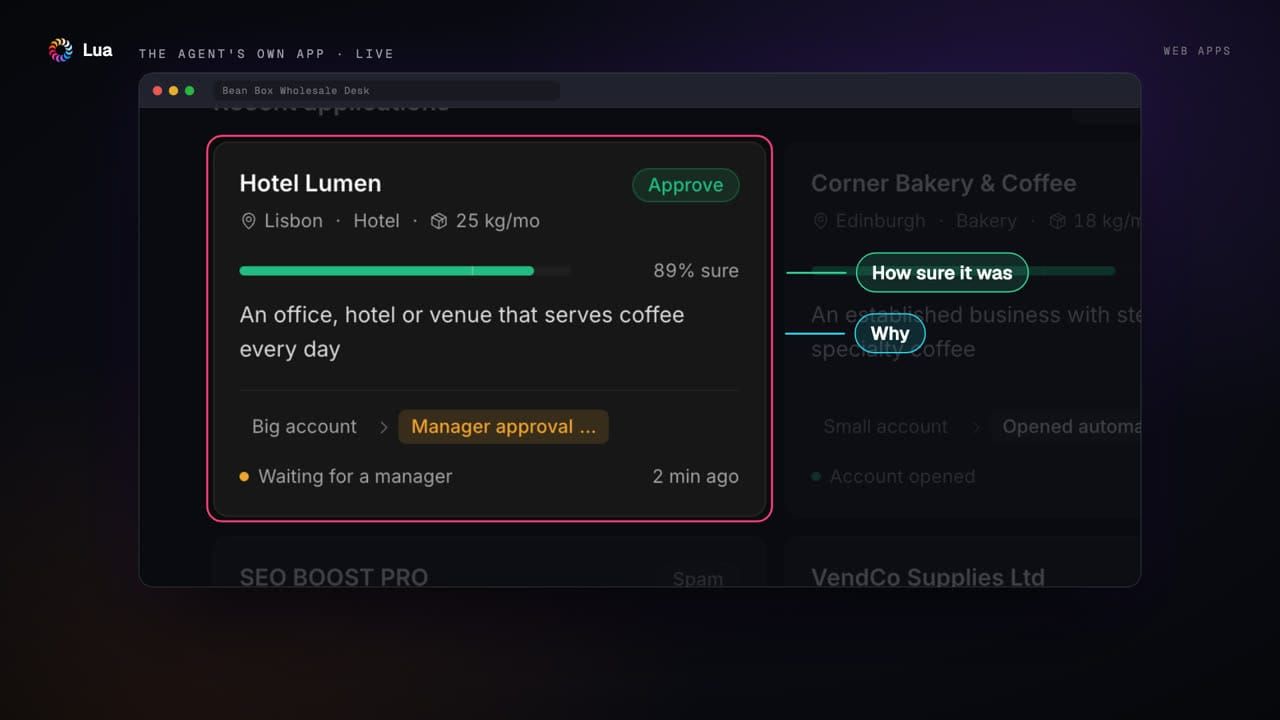
Nobody built a dashboard for this. The agent comes with its own app, which I've called the Wholesale Desk. The top shows today at a glance (approved, sample packs, declined, and who's waiting on me). Underneath there's a card for each application with the call, the reason, how sure it was and what happened next.
It opens in Workspace and in the Lua desktop app, and it works fine on a phone. When a kiosk in Riyadh applied in Arabic, the desk showed their message right to left. On desktop the agent sits next to the app, so I can just ask it things like "why did you decline VendCo?"
The Wholesale Desk, the agent's own app, in Workspace and the desktop app.
4. Log drains
The desk keeps working while we're asleep, so someone needs to be able to see what it did. A log drain sends every run, decision and pause, as it happens, to whatever monitoring tool you already use. That can be Better Stack, Datadog, Splunk, Grafana Loki, New Relic, Amazon S3 or any HTTPS endpoint.
It's private by default, so what customers wrote stays out of the logs unless you turn that on. If your tool goes down the drain keeps retrying, and anything it can't deliver gets reported instead of quietly disappearing. In practice a failed run becomes an alert, and "show me every decline this week" is a single search with the reasons attached.
Log drains, sending every run to the monitoring tool our ops lead already uses.
A day on the desk
These are real runs from the live agent. It checks every 15 minutes, which works out at 96 runs a day.
- The Daily Grind, Leeds (12 kg a month) was approved at 72% confidence, so only just over the line. The account opened and the welcome email went out without anyone touching it.
- Northside Coffee Co., Manchester (40 kg a month) counts as a big account, so it's sitting there waiting for me to approve it.
- SEO BOOST PRO was spam. Logged, dropped, no reply.
- A café that applied twice got caught by the rules before the AI was even asked.
What changed
Applications now get an answer the same day, instead of whenever someone got round to them. I only look at the big ones. Every call comes with a reason I can read (and disagree with if I want). Our ops lead can check all of it without having to ask anyone. I'm not going to put a percentage on any of that, since it's a made-up business, but that's what it feels like to run.
Build your own
If you want to try this for your own business, here's the whole loop in Claude Code with the Lua plugin:
/lua-architectto describe the problem in plain English and get a plan/lua-initto set up the agent/lua-newto add each piece the plan suggests/lua-workflowto run it against the awkward cases, like an application right on the threshold, one it isn't sure about, a double application, spam, another language, or a manager who never replies. Fix things and run it again./lua-deployto go live once all of those behave
Everything you need is in the Lua docs. If you build something with it, send it my way. I'd love to see it.